Showing posts with label tricks. Show all posts

17 Dec 2015

How to speed up Lagging android Phone without installing any Application ?

If your android phone is getting slow and lagging frequently, and installing any external apps isn't solving the problem then we have a nice solution for you.


First understand the possible cause:

Your android phone may be getting slow due to a higher animations scale, in which different animations takes a longer time to complete, or due to too many running apps in the background, consuming your phone's battery and RAM.

Now Let's get to the Solution:

For speeding up the phone, we will decrease the animation scale and limit the number of the background processes, eventually, this will increase your phone's battery life.

For this Approach, first of all, enable the 'DEVELOPER OPTION' in your android phone by tapping 5 to 7 times on 'Build Number' [settings > About Phone > Build Number].
[See Video Below]
After enabling 'Developer options' open it and scroll down to 'Drawing' section and decrease all animation scale to 0.5x.
then scroll down to 'Apps' section and click 'Background process limit' and select 3 or 4 processes.

video help:


That's it, now see the difference while using your phone.

7 Dec 2015

How to deal with redirecting ad type virus in Android

Recently I faced an issue with my android device whenever I would try to access a link or do a google search in Google Chrome / Mozilla Firefox, I would get redirected to Malware/Adware sites.

The Problem:
These Malware / Adware sites then redirect to  an annoying pop up saying that I have won an Award or My Tab has a dangerous Virus.And there is no way of going back to the previous site.
I tried many anti-virus and anti-malware but no relief.


Solution:
First of all, Clean Junk and any unnecessary stuff from your device using any cleaning app, like Clean master then try a Good anti-virus or anti-malware, if it works for you then good luck.
If it doesn’t work then here are two quick solutions,
1. Delete your browser Directory Manually by connecting your device to PC and then,
Android >> data >> browser(chrome) >> shift-Delete


2. Try to open your web page in ‘Desktop’ Mode by Clicking the ‘Request desktop site’ option. this is not a permanent solution but a good one if you are trying to do a secure transaction on your android device (like, banking).


11 Jul 2014

How to enable offline mode in Google chrome

If you want to browse web pages while offline in Google chrome then better learn following tip.
This method works in PC , Mac and android devices.
To enable offline mode type following in the address bar of Google chrome and click on enable option in follow up screen.

chrome://flags/#enable-offline-mode

Now browse web page saved in browser while you are offline (like. While traveling in a plane).


28 Feb 2014

Gmail is dot(.) and text addition (+) insensitive, and you can make use of it.

Do you really know that "abc@gmail.com" is same as "a.b.c@gmail.com". In other words to say 'Your Email address is similar but has more or fewer dots(.) or different capitalization'.
So if you receive a message sent to address similar to your address having different arrangements or number of dots then don't freak out, it's your own email address. i.e. all following addresses are same
  • homerjsimpson@gmail.com = hom.er.j.sim.ps.on@gmail.com
  • homerjsimpson@gmail.com = HOMERJSIMPSON@gmail.com
  • homerjsimpson@gmail.com = Homer.J.Simpson@gmail.com

Gmail is Insensitive to text addition (with +) to username
i.e. 'abc@gmail.com' is same as  'abc+xyz@gmail.com'.
so, if you are sending message to 'a+b@gmail.com' then it'll go to mr. 'a@gmail.com'.

How to use this feature,
These features can be used to detect spammers.For example, if you are singing up for a particular service then give them different username as (abc+service@gmail.com). And in future if you get any spam mail, you can easily detect from where those spammers got your email address.
Let's try to understand with following images.
Received mail:
From Received mail address you can tell that, site B sold your email address to spammers.
Note :Register with your original Id on Google Apps,because they treat dots(.) as characters.


27 Feb 2014

YouTube secrets that will amaze you

YouTube is source for entertainment and information but besides videos YouTube has other secrets which will surely amaze you.
Following are the some of secret facts we could find, if you got some then share in the comments.

1.  Snake Game
     If your video is taking too long to load, you will notice a buffering circle.That circle will become Game of Snakes by simply pressing Left key on your keyboard.


2. Missile Control
    While watching video type number '1980' anywhere(not in comments and search bar section) and the game Missile Control will pop up. Blow missiles and defend video from destruction.


3. Use the force Luke
    type 'Use the force Luke' in search bar and see how whole page suddenly shifts around and controlled by your mouse movement.

4. beam me up scotty
    Type 'beam me up scotty' in search bar and see how results will beam up just like the enterprise's transporter effect from star-trek.

5. Geek Week 
    Type '/ Geek Week' and get the Geeky retro ASCII version.


6. Stats for Nerds
     Right click on video and select 'stats for nerds' to know details of video you are watching.


7. Do the Harlem shake
    Search for 'do the harlem shake', your search result will start dancing on the song "Harlem Shake" .


26 Feb 2014

Facebook secrets you should know

In this post I am going to share some tips for Facebook.If you are a regular user of Facebook then these will come handy for you.


1. Use 'J' and 'K' keys to scroll between feed stories.

2. You can enter password even with Caps lock 'On' , i.e. 'PassWord' = 'pASSwORD'

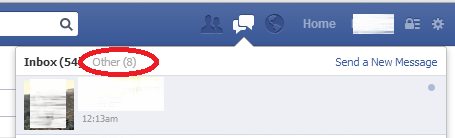
3. See message from non-friends in 'Other' folder


4. Emoji  anybody by putting their username in [[username]] in your chat box.[not works in mobile]


5. Change language to English[Pirate] 'or' English[Upside down].
     - freak your friends by doing this to their profile in their absence.

If you have interesting tips/tricks related to Facebook, please feel free to share in the comment box.